Teleprompter - Video Captions
Publisher Description
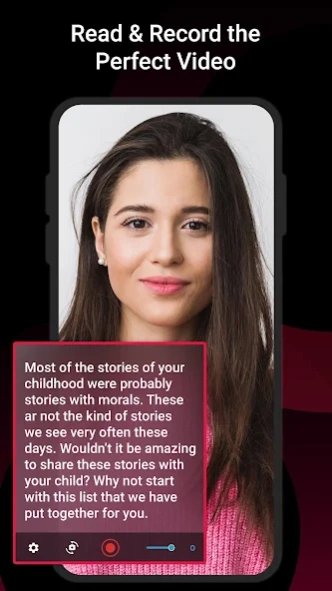


Use Teleprompter app to display scrolling text on a screen and to record video.
A teleprompter app is a software application that displays scrolling text on a screen or device, allowing speakers or performers to read from the screen while looking directly at the camera or audience. It is commonly used in media production, presentations, speeches, and video recordings to help speakers deliver their lines or speeches smoothly without having to memorize them or rely on written notes.
Teleprompter app typically offer features such as adjustable scrolling speed, font size, and color, as well as the ability to import or edit text on the screen. This app is used on smartphones and widely utilized in various professional settings to enhance communication and presentation skills.
Some common features of teleprompter app include:
1. Text import and editing: Video Teleprompter app typically allow you to import or create your own text, and provide text editing capabilities such as font size, font color, background color, and formatting options.
2. Adjustable scrolling speed: You can typically control the speed at which the text scrolls on the teleprompter screen, allowing you to customize the reading pace to your preference or speaking style.
3. Mirror mode: Video Teleprompter app also offer a mirror mode, which reflects the text in a mirrored or flipped orientation so that it can be easily read from a reflective teleprompter glass or beam splitter setup.
4. Video Recording: You can us this teleprompter for videos. Through this app, you can also do video recording and the recorded video will be saved in your device gallery.
5. Customizable settings: Users may be able to customize various settings, such as the text size, scrolling, and display orientation (portrait or landscape) to suit their specific needs.
6. Offline mode: Teleprompter app has an offline mode that allows users to work without an internet connection, making them suitable for remote locations or situations where internet access is limited.
7. Multiple video scripts: you can also create and manage multiple video scripts within the app which will allow you to switch between different scripts seamlessly.
8. Customizable display: Users may be able to customize the teleprompter display, such as changing the text color, background color, or font style, to suit their visual preferences or the specific environment in which they are using the teleprompter.
9. Video Caption: You can create a video with video caption while reading the video script.
Some common users of Teleprompter include:
➤ News anchors and reporters: Teleprompter are often used in television news broadcasting to display scripts for news anchors and reporters to read while on camera, allowing them to deliver news content fluently.
➤ Politicians and public speakers: Politicians, public speakers, and other individuals who deliver speeches or presentations at public events often use Teleprompter
➤ Video content creators: YouTubers, vloggers, and other online video content creators often use Teleprompter to help them deliver their video scripts or talking points in a professional and engaging manner.
➤ Corporate presenters: Executives, trainers, and other corporate presenters may use Teleprompter during company meetings, conferences, or training sessions to deliver their presentations smoothly and confidently.
➤ Broadcasters and podcasters: Teleprompter can be used by broadcasters and podcasters to read scripts or introductions during live or recorded broadcasts, helping them stay on track and maintain a professional delivery.
➤ Actors and performers: Teleprompter can be used in theater productions, television shows, and other performing arts settings to help actors and performers remember their lines and deliver their performances smoothly.
➤ Educational instructors: Teachers, professors, and instructors may use Teleprompter during lectures or presentations to ensure they cover all the necessary content while maintaining eye contact with their students.
About Teleprompter - Video Captions
The company that develops Teleprompter - Video Captions is Vk.soft.Dicapp. The latest version released by its developer is 1.0 .
To install Teleprompter - Video Captions on your Android device, just click the green Continue To App button above to start the installation process. The app is listed on our website since 2024-04-05 and was downloaded 2 times. We have already checked if the download link is safe, however for your own protection we recommend that you scan the downloaded app with your antivirus. Your antivirus may detect the Teleprompter - Video Captions as malware as malware if the download link to com.vksoft.telepromter.video.captions is broken.
How to install Teleprompter - Video Captions on your Android device:
- Click on the Continue To App button on our website. This will redirect you to Google Play.
- Once the Teleprompter - Video Captions is shown in the Google Play listing of your Android device, you can start its download and installation. Tap on the Install button located below the search bar and to the right of the app icon.
- A pop-up window with the permissions required by Teleprompter - Video Captions will be shown. Click on Accept to continue the process.
- Teleprompter - Video Captions will be downloaded onto your device, displaying a progress. Once the download completes, the installation will start and you'll get a notification after the installation is finished.
